Sunday, October 09, 2011

Plagiarism in the digital era

This infographic, "Cheating in school: How the digital age affects cheating and plagiarism" by Loreal Lynch in Schools.com (September 16, 2011) provides a visual snapshot of the extent of the problem.

"Many students can’t even distinguish between what constitutes plagiarism and what doesn’t. According to recent research, 71% do NOT believe copying from the Web is “serious cheating.”
Loreal Lynch (September 16, 2011)

Cheating in the digital age
Courtesy of: Schools.com

Plagiarism and cheating appear to be an endemic problem in the digital era, facilitated by the ease of copying from the vast resources of the web, general ignorance, lack of understanding of ethical use or a laissez-faire attitude by users.

Digital Citizenship should be an integral part of learning in the digital age and this includes ethical use of resources. Creative Commons licensed resources - finding, using, correct attribution, re-mixing, creating, publishing and contributing to the shared pool - help in reducing the blurring factor as mentioned by Loreal.

The infographic is a good starting point for discussion in the classroom or meeting room.

Monday, May 23, 2011

QR Codes in education

Interested in an introduction to QR Codes for education?

This slideshare presentation by Marielle Lange provides both an introduction to QR codes eg definition, creation, tips and and some ideas that educators can use to get those creative juices flowing.

Thursday, February 24, 2011

Mobile learning

The Voxy blog has posted an infographic about mobile learning an (including Creative Commons licensing and accompanying embed code) with some ideas for discussion or further research.


I'm not such a fan of the "digital natives" label but the visual and ideas in "Are We Wired For Mobile Learning? [INFOGRAPHIC]" should prove useful in discussions about mLearning.

Monday, August 30, 2010

10.10.10 or One Day on Earth

Join the One Day on Earth movement and participate on 10/10/2010.

This is a global 'multi-platform participatory media project' event where everyday people, including students and teachers, are encouraged to document and record a story of shared human experience over a 24-hour period. The aim is to capture the diversity of life and culture on this planet on a particular day, 10th October, 2010 (10.10.10).
"One Day on Earth is a documentary and new media project about the amazing diversity, conflict, tragedy, and triumph that occurs in one 24-hour period on Earth."
One Day on Earth Open Source Global Documentary Project Badge

The organisers of One Day on Earth anticipate that capturing and sharing stories over 24 hours will utilise the power of the participatory culture, raise awareness and "foster a greater sense of global empathy and, ultimately, action towards a more sustainable and equitable planet."

Educational digital media toolkits will be available to educators who register onsite.

The toolkit will contain videos, slideshows and PDFs to support students in brainstorming and basic film/video concepts as well as
curricula and lesson plans to support participation as photographers, filmmakers, journalists and world citizens.

One Day on Earth Participant Trailer from One Day On Earth on Vimeo.


Through participation, planning and collaboration using contemporary communication formats, students should better undertsand the diversity of people and cultures.


An exciting and authentic learning experience!

Saturday, August 28, 2010

Catchy Apostrophe Song App!

'Put the apostrophe back in its place!'
That's the aim of this fun and catchy
new app, The Apostrophe Song App, created by a local Adelaide (South Australia) company, Cool Rules. I purchased this low cost App for the Apple iPhone/iPad/iPod touch from the iTunes Store.

Check out Cool Rules and preview the songs (four different versions eg pop/rock, hip hop, rap, acoustic)
. The site has a number of resources with 'useful punctuation tips and exercises (which) can be downloaded free of charge'. You can download the words and music and burn the songs to CD (once you have purchased the app).

Check the YouTube video.


Join the Cool Rules Schools’ Challenge.

Record your own version of The Apostrophe Song and contribute to the Cool Rules Song Library.

Real-time polling/mapping

SurveyMapper looks like a very useful tool.
This is a free real-time geographic survey and polling tool from the Centre for Advanced Spatial Analysis, University College London.
It is currently in beta release. The tool is an example of social simulation resources (part of an academic research project) and is free to use for non-commercial purposes.

There are many polls available (including analytics) but the bonus in using SurveyMapper is the addition of real-time mapping (and the number and choice of map options appear to be still under development). Select a date range to open and close your poll.


The site utilises GoogleMaps and provides some quick sharing options eg via Twitter, Facebook, Delicious, Digg and Reddit to promote your survey.

I experimented with a very quick poll,
'Is your school using mobile devices for mLearning?' (mobile/cell/smart/ phone, iPod, iPodTouch/iPad, or similar) with a simple Yes or No choice to start with but have not promoted it.

I hope to create a more complex poll on a social issue to test SurveyMapper's functionality. I love the combination of a free and easy to use polling tool and visualization of results (via mapping eg. global), charts and geo-codes, all updated in real-time.

Tuesday, July 27, 2010

Quick brainstorm

Just checking out Answer Garden quick feedback poll.
Answer Garden claims to be "A minimal tool for maximum feedback"

What Web2.0 tool tops your list for use in education?... at AnswerGarden.ch.


Wednesday, June 30, 2010

Augmented Reality and Ubiquitous Learning

Interest in Augmented Reality (AR) and its potential for education has increased greatly in the past 6 months. It was highlighted as one of the emerging technologies to watch in the '2010 Horizon Report K-12 Edition' (pdf) Collaboration between the New Media Consortium and the Consortium for School Networking (CoSN).
"Augmented reality has strong potential to provide both powerful, contextual, in situ learning experiences and serendipitous exploration and discovery of the connected nature of information in the real world'
2010 Horizon Report K-12 Edition'

Advances in mobile devices, better connectivity, new and simple tools, new and creative learning experiences and a fascination with geolocation have contributed to the buzz.
One of my favourite sources of up to date information on AR is Digital Buzz. And, of course, the twitterverse.

'Exile on Your Street' by The Rolling Stones is an example where users can create a virtual poster, with a track from Exile on Main St. To view the poster you need an iPhone 3GS or Android plus the mobile AR browser, Layar.

Two other examples are the ACWAR Civil War project and
London: past and present in London Museum Releases Cool Augmented Reality App and Street Museum.

7Scenes is an exciting mobile storytelling platform. Some colleagues tried this out last week as a team, testing its creative potential for creating a mobile virtual tour with images, text, audio and questions in the local area. Great teamwork and the geolocation feature is really cool.

An e-School news item , 'Augmented reality takes hold in classrooms' (Educators say enhanced learning experiences can lead to engaging lessons) by Laura Devaney (May 10, 2010) suggests that AR 'raises the level of interaction for students'. This involves mobile / handheld GPS-enabled devices, connectivity, creativity and imagination.
"A small but growing number of (US) schools across the nation are turning classroom lessons into engaging experiences with augmented reality (AR), a technology that overlays digital information on top of real-world surroundings as viewed through a smart phone or other handheld, GPS-enabled device."

AR is taking the world of marketing by storm and an article by Chris Cameron in ReadWriteWeb (June 23, 2010) asks
the question, Can Augmented Reality Help Save the Planet?

Ubiquitous learning, anywhere anytime is part of the mobile learning landscape.
What are your thoughts on AR?

Saturday, May 01, 2010

Best ways of using Moodle on Slidseshare by Sandra Pires

The 'Best ways of using Moodle' Slidseshare by Sandra Pires is a useful resource for teachers considering how they might better utilise the potential of Moodle to enhance the learning experiences for their students.

Wednesday, March 03, 2010

Creating, capturing, sharing

I have been trying out a few online tools from my Delicious bookmarks (Vonnie) and this experiment involves a pet theme of digital citizenship, utilising a UK bullying flash poster tool, with an option to make use of QR-Codes and mobiles to capture and share the result.

I opted to tweet my demo poster (image below) to join the others on Twitter Bullying posters. The image highlights awareness and understanding of digital footprints and social networking.

The UK Bullying Flash poster maker website allows students to create a poster, selecting from a range of backgrounds, creating characters and selecting from a range of anti-bullying / internet safety / digital citizenship messages. These can be published, shared and reviewed by peers.

Images can be shared using a range of Web2.0, social media options, sent via e-mail, bookmarked, embedded via source code or downloaded. (Some options are blocked/filtered in schools).
The images can be integrated into a range of learning activities by innovative teachers. This online tool could be useful in exploring the topic of digital citizenship.

One option i
ncludes use of mobile phones to capture/view/share using QR-Codes and the free Kaywa Reader. Once installed on a user's mobile phone, it can be used to quickly scan the image (hence the name Quick Response Code).

The QR-Code Reader can be downloaded direct to your internet-connected mobile phone or to your computer. Taking a quick view of a QR-Code is a snap! This reveals the content behind the code.

Other learning activities can utilise the QR-Code Generator.
These can be generated using the computer and added or embedded in other media.
One teacher using QR-Codes in his classroom is Greg Kulowiec who has posted some interesting ideas on his
blog.

Share your ideas on using QR-Codes, m-Learning, digital citizenship?

Monday, December 28, 2009

iMoot online conference starts Feb 4 2010

Attention Moodlers...
The date for the
iMoot global online conference (31 timezones, 210 countries) has been changed.
It will now start on February 4, 2010 instead of the previously advertised start date of January 7.

Sunday, December 27, 2009

What's your Twitter account worth?

Checked out one more of the plethora of Twitter tools.
It's called, 'What's your Twitter account worth?'

Apparently its worth $112 and my rank is #18961 out of 102437)

I guess it's something to do with the fact that major search engines are now trawling the twitterverse and integrating relevant tweets into results to add that 'real-time' or near critical and much valued element to searches.
Or?


$112

Created by WhatsMyTwitterAccountWorth.com

Another couple of interesting Twitter tools are the TPS or Tweet Positioning System which adds a spatial dimension to conversations and Snap Bird to help re-find the tweets that got away!

Friday, December 18, 2009

Moodle Cool Course competition extended

The Moodle Cool Course competition has been extended into the new year.
The new closing date is 19 January 2010.

"The purpose of the Cool Course Competition is to encourage people to donate great Moodle demo courses for our Moodle demo site and to start building our demo community hub for Moodle 2.0."
(Helen Foster)

Check out the existing entries on the site.

Thursday, December 17, 2009

Social Media and Learning2.0

The use of Social Media, so popular for social networking, is expanding into business, government and education worlds. Many companies are beginning to embrace the use of new social networking / media tools for promotion, marketing, engagement and interaction with clients and staff development but approaches and guidelines vary. These reports and resources outline a few examples.

Many educators see the potential of social media / web2.0 for teaching and learning and their own professional learning but access is often restricted in schools and filtering is an issue, as discussed in many blog posts.

As use of social media becomes more widespread in the community, le
arning2.0 research reports are of interest, including 'Learning 2.0: The Impact of Web 2.0 Innovations on Education and Training in Europe' - Final Report (2009) - European Commission Joint Research Centre. This 'describes how the emergence of new technologies can foster development of innovative practices.' It provides pointers for new directions and opportunities using new tools and new approaches in teaching and learning.

The Australian Government Gov2 taskforce is about to release a report, 'Engage -- Getting on with Government 2.0', which is expected to outline how the use of new social media technologies can help to make public sector services more efficient and to better meet the needs of the community.

Image by woodleywonderworks
http://www.flickr.com/photos/73645804@N00/3328850666

Telstra (Australia) has come up with a new staff training guide for social media, the 3Rs of social engagement, for their 40,000 employees, as outlined in a recent post on Mashable. The '3Rs' are identified as responsibility, respect & representation. This online training package includes a comic style flip book with media clips.

The 'Ten Commandments of Social Media' by Robb Clarke aims to provide an easy to read personal guide to operating in an ethical manner, to not only 'make you a better person' but to also ensure a 'more appreciative' bunch of followers. Again, ethics are highlighted.

Social media, eg
Twitter, is a vital component of developing and nurturing an educator's professional learning network (PLN) in a connected world and for lifelong learning in the digital age.


Wednesday, December 16, 2009

Creativity, QRCodes and Geocaching

This week some colleagues carried out an activity, combining the use of QRCodes and geocaching. It was part of a collaborative experience and sharing of knowledge after a team meeting. (Check a short explanation of QRCodes here).
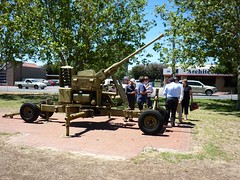
We organised the route to suit a walk back from a lunch break and used the QRCodes and code readers on iPhones to scan and then locate the prize - a heritage item (40mm anti aircraft gun) located in the middle of Port Road at Hindmarsh.
One member of the group, Paul created the original QRCode for the team and had secreted another at the spot. Once found and scanned, the QRCode link provided the essential additional information we needed, via a mobile site Paul had created.


My Flickr photo (Southoz) shows the team in the vicinity of the heritage 'bofors gun' as we checked out Paul's mobile site after scanning the hidden QRCode.
Next, the team intended to use an iPhone app to locate a geocache nearby that was created as part of a previous teacher workshop. This geocache has been registered on Geocaching.com since 2004 (Pathway to the sea and hills) GCHTVX - check the Google map on the site in the vicinity of the brewery at Thebarton.

It is a traditional cache, easy level of difficulty and easy terrain, to suit a group pf teachers getting started with geocaching. The site provides a very useful clue to locate the geocache.
It has been discovered quite a few times in the past 5 years and is in need of a little TLC. Geocaching is even more popular now as an adventure activity, especially for family groups.

There is a lot of potential in using Geocaching and QRCodes creatively in education - literacy, numeracy, ICT, problem solving, teamwork and collaboration. The greater shift towards mobile and anywhere, anytime learning, increasing accessibility and connectedness and new tools make this easier than before.

I recently discovered the excellent BeQRious site (via my Twitter PLN) which has a generator and many examples of use of QRCodes in a range of settings. Check my Delicious bookmarks for QRCodes for other links.

Another area of interest is augmented reality and I am currently exploring Layar.and Google Goggles. Check the video.
Augmented Planet also has an interesting recent post on Google Goggles and Augmented Reality.

Tuesday, September 22, 2009

Twitter for Busy People

Twitter for Busy People is one of my favourite Twitter tools. This tool allows me to save my Twitter user name and quickly access the last tweet from the people I follow on Twitter.

It organises tweets by last hour, last day last week... in a visual and appealing interface. I have used t4bp for many months now and find it really useful.
Just hover over any person's image/avatar and their latest tweet comes into view.

A very handy tool for quick updates on the go and checking on members of my PLN.

Tuesday, August 04, 2009

Lyrebird on YouTube

Just have to promote this southoz highlight at the Adelaide Zoo (South Australia).

Meet the superb male lyrebird from the Adelaide Zoo, fondly known as 'Chook'. Why has 'Chook' gained global attention of late? Check this YouTube video and listen to his amazing repertoire of sounds. This lovable lyrebird mimics the sounds of his surrounding environment and that includes the sounds of construction work on the nearby Giant Panda enclosure.

Not only can you detect the sounds of other zoo birds, including the kookaburra, but also the typical sounds of the nearby construction work!


'Chook' is sure to get his share of attention at the Adelaide Zoo, even as the anticipation and excitement builds as the date draws closer for the arrival of two Giant pandas from China (Wang Wang and Funi).

Listen carefully to hear the full repertoire.

Saturday, July 04, 2009

Twtpoll (Twitter access)

Users of the popular microblogging site, Twitter, can access their account using a variety of tools or twittertools, via the Twitter website, phone and mobile apps.

What do you use most frequently when you access Twitter?
Mobile options are grouped under mobile and some of the possibly lesser known twittertools have been grouped as 'Other' to keep the number of choices to a reasonable number.


Try the Twtpoll. (Closes July 31, 2009)

Tuesday, June 09, 2009

Mobile Museums

Interested in m-Learning, mobile presence, enabling and connecting learners and, as the title of this engaging presentation suggests, new learning trends with digital technologies? Incidental, informal, ubiquitous, lifelong learning is enabled with innovative learner-centric strategies and evolving mobile tools.

@dannno or Dan Sutch from FutureLab provides a glimpse of the (near?) future,"changing educational paradigm" and participatory culture in this SlideShare presentation.


Evolving mobile technologies and tools, 'always on, always connected,' authentic learning experiences are beginning to emerge. There are still many barriers to more widespread adoption. This presentation provides a range of ideas for exploring new connections for innovative learning and stimulus for discussion in education circles.

Monday, June 08, 2009

Giant Cuttlefish video

I have posted a short video to my SouthOz Flickr account of the spectacular diving attraction of the Giant Cuttlefish during their annual breeding season in the shallow waters off Point Lowly, South Australia in June 2009.

This short video shows a Giant Cuttlefish pulsating its skin to deter other male cuttlefish in the vicinity. This video was taken in the area known as 'the fenceline' off Point Lowly, Whyalla in South Australia.

This area is one of only two places in the world where this spectacular annual event occurs. It is a major tourist attraction for divers from around the globe.


The site is under threat from a proposed desalination plant for an outback mining venture and new wharf facilities for another new mining proposal. This marine environment is precious. Help protect it from developments which threaten its existence!

I have also posted a set of Giant Cuttlefish photos on Flickr.